The useful part of AI business-idea generation is not asking a chatbot to invent random startups. It is using AI to collect repeated frustrations from real conversations, then turning those frustrations into opportunities you can investigate.
That is why my process starts with Reddit and Quora rather than a blank page.
My five-step process
1
Choose a specific audience
I start with a group of people and a topic. For example, students in the USA, independent restaurants, new parents, or small online sellers. A defined audience gives the research somewhere useful to go.
2
Look for problems, not startup names
I ask Genspark to research public discussions on Reddit and Quora. I am looking for repeated frustrations, workarounds, unanswered questions, and tasks people say are expensive, confusing, or time-consuming.
3
Turn the research into comparable options
The AI Sheet gives every idea the same fields, so I can compare the problem, opportunity, possible solution, budget, and pricing model without jumping between dozens of loose notes.
4
Pick a problem I can understand and test
A large market is not enough. I look for a problem I can explain, reach people about, and test with a small first version. The table is a shortlist, not proof that customers will buy.
5
Build the smallest useful version
Once an idea survives a basic validation check, I can use Lovable to turn the concept into a working prototype. Building comes after the problem research, not before it.
The prompt
The prompt I give Genspark
I make the audience clear and ask for both the problem and the business case around it. Here is the prompt from my process:
Go to Reddit, Quora and find 50 pain points students in the USA have discussed. Share the pain points, categories for the problems, market opportunity for that pain point, TAM, potential AI-powered solution, budgets to start, and pricing models. Add anything else you deem relevant.
Change the audience and topic to fit the market you want to explore. Keep the output fields when you want ideas that are easier to compare.
Run the research in Genspark AI Sheets
Genspark can research the public conversations, generate multiple opportunities, and arrange the result in a table you can scan and refine.
Affiliate link, we may earn a commission at no extra cost to you.
Why I like Genspark AI Sheets
The main advantage for me is the format. Instead of receiving a long list of disconnected ideas, I get a clean table where each row is an opportunity and each column answers a different question. That makes it much easier to scan, sort, and decide which ideas deserve more research.
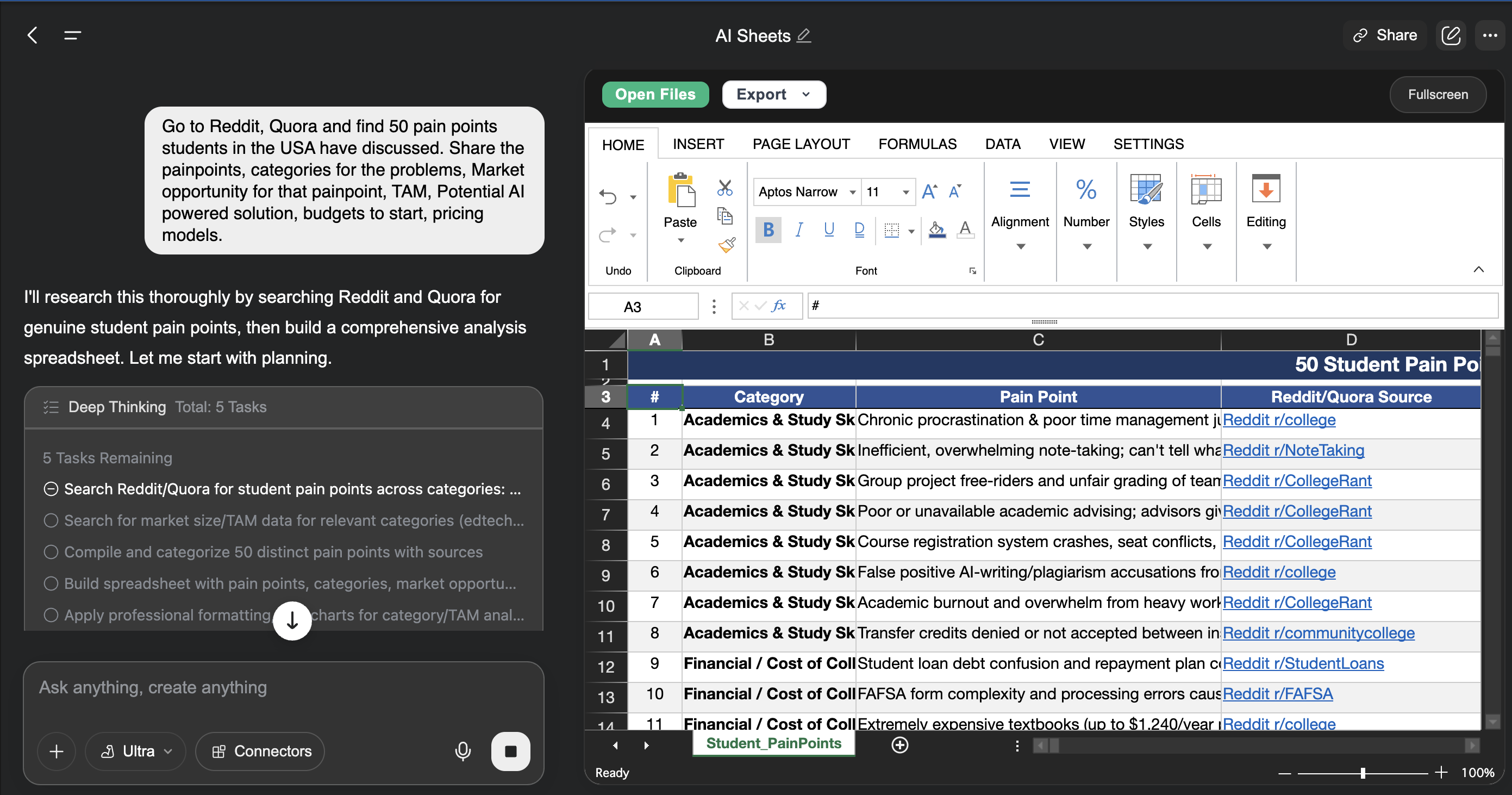
| Pain point | Category | Market opportunity | TAM | AI-powered solution | Startup budget | Pricing model |
|---|---|---|---|---|---|---|
| Students struggle to find affordable, reliable last-minute academic support. | Education | Recurring need around deadlines | Estimate after validation | A guided study-planning and resource-matching tool | Prototype first | Freemium or subscription |
The example above is illustrative. I treat the market-size and budget figures as hypotheses to check, not facts to publish without evidence.
Before I build
The AI gives me options. I still make the decision.
I do not treat a row in the Sheet as a validated business. AI can misread a discussion, overestimate a market, or suggest a solution that people do not actually want. Before building, I narrow the list and check:
- Are people describing the problem in their own words, repeatedly?
- Can I identify a specific first user and reach them ethically?
- Is the pain costly, frequent, urgent, or frustrating enough to solve?
- Can I build a small test that proves something in days rather than months?
- What would make the idea unsafe, misleading, too expensive, or difficult to support?
I also open the original discussions where possible. The summary is useful for finding patterns, but the source context helps me understand what people actually mean and whether the same pain point has been mistaken for several different problems.
Turn the best idea into a prototype
Once a problem has evidence behind it, Lovable helps me move from a clear product brief to a working web app that I can put in front of early users.
Affiliate link, we may earn a commission at no extra cost to you.
The workflow in one sentence
Find real conversations → extract repeated pain points → compare opportunities in an AI Sheet → validate the problem → build the smallest useful solution.
Affiliate disclosure: This article contains affiliate links. If you sign up through the Genspark or Lovable links, I may earn a commission at no extra cost to you.
Keep the research grounded in public evidence, protect people’s privacy, and remember that a polished AI table is a starting point for judgment, not a substitute for talking to potential users.